

Relocating an office sounds straightforward until you start comparing estimates and uncovering hidden expenses.
Many business owners focus only on transportation costs, but labor, technology setup, employee downtime, scheduling, and logistics often have a greater impact on the final budget. Understanding office moving costs Clearwater businesses typically face helps organizations plan effectively, avoid surprises, and maintain productivity during relocation.
Whether you’re moving a small office, a medical practice, a law firm, or a growing corporate workspace, this guide explains the major cost factors, planning strategies, and business continuity considerations that influence relocation expenses.
Understanding Office Moving Costs Clearwater Businesses Should Expect
Several factors determine the total cost of an office move.
The most significant cost drivers include:
Office Size
Larger offices generally require:
- Additional movers
- More transportation resources
- Longer relocation timelines
- Greater packing requirements
Moving Distance
Local office relocations usually cost less than regional or long-distance business moves.
Furniture and Equipment
Conference tables, filing systems, cubicles, and specialty equipment often require additional labor.
Technology Requirements
Computers, servers, networking equipment, and communication systems require careful handling and planning.
Building Access
Loading docks, elevators, parking limitations, and property management requirements can affect labor time and scheduling.
Understanding these factors creates a stronger foundation for budgeting.
The Office Relocation Cost Planning Framework
One of the biggest mistakes businesses make is focusing solely on moving quotes.
A smarter approach is evaluating the full financial impact of relocation.
Step 1: Inventory Business Assets
Document furniture, technology, equipment, and records.
Step 2: Estimate Downtime Risks
Identify departments that could experience operational disruptions.
Step 3: Evaluate Technology Requirements
Consider network installations, equipment setup, and communication systems.
Step 4: Assess Labor Needs
Determine packing, transportation, and setup requirements.
Step 5: Build a Contingency Budget
Reserve funds for unexpected expenses and schedule changes.
Step 6: Compare Total Relocation Impact
Evaluate productivity, downtime, and operational continuity alongside transportation costs.
Businesses that follow this framework often make better relocation decisions.
Office Relocation Budget Allocation Guide
A practical budget should account for more than transportation.
| Budget Category | Typical Focus |
|---|---|
| 50% | Moving labor and transportation |
| 20% | Technology relocation and setup |
| 15% | Packing supplies and preparation |
| 15% | Contingency and unexpected expenses |
This framework helps businesses avoid underestimating relocation costs.

Why Downtime Often Costs More Than the Move
Many organizations focus on reducing moving expenses.
However, downtime frequently creates greater financial consequences.
Lost productivity may affect:
- Customer service
- Revenue generation
- Internal operations
- Client communications
- Project completion schedules
According to the U.S. Small Business Administration, operational disruptions can create significant financial challenges when businesses fail to plan adequately.
Reducing downtime often delivers greater savings than selecting the lowest moving estimate.
Cost vs. Downtime: The Hidden Expense Many Businesses Miss
A lower moving quote does not always result in lower overall relocation costs.
Consider two scenarios:
Scenario A
Lower moving quote
- Limited planning support
- Longer setup times
- Increased employee downtime
- Delayed operations
Scenario B
Professional relocation support
- Better organization
- Faster setup
- Reduced downtime
- Faster return to productivity
Many businesses discover that minimizing downtime generates larger savings than reducing transportation costs alone.
This is why successful companies evaluate total business impact rather than focusing solely on estimates.
Business Relocation Tips for Better Cost Control
Strong business relocation tips often focus on preparation.
Businesses can reduce costs by:
Decluttering Before Moving
Transporting fewer items reduces labor and transportation requirements.
Planning Early
Advance preparation improves scheduling flexibility.
Labeling Assets Clearly
Efficient labeling speeds unloading and setup.
Creating Department Plans
Organized teams reduce confusion and delays.
Using Professional Packing Services
Proper packing protects equipment and improves efficiency.
Preparation remains one of the most effective cost-control strategies.
Clearwater Commercial Relocation Challenges
Businesses relocating within Clearwater often encounter unique logistical considerations.
Downtown Clearwater Traffic
Traffic congestion may affect truck scheduling and delivery timing.
Parking Restrictions
Limited commercial parking can impact loading and unloading efficiency.
Elevator Reservations
Many office buildings require advance scheduling.
Shared Loading Docks
Businesses often compete for loading dock availability.
Property Management Requirements
Commercial buildings may require certificates of insurance, moving permits, or approved moving schedules.
Professional movers familiar with Clearwater can help businesses navigate these challenges more efficiently.
Department Cost Impact Checklist
Different departments influence relocation costs in different ways.
Information Technology
- Network setup
- Equipment migration
- Data protection
Operations
- Inventory management
- Equipment coordination
Customer Service
- Communication continuity
- Phone system setup
Sales Teams
- Client updates
- Contact management
Administration
- Vendor coordination
- Documentation management
Understanding departmental needs helps businesses allocate resources more effectively.
Technology Relocation and Cost Management
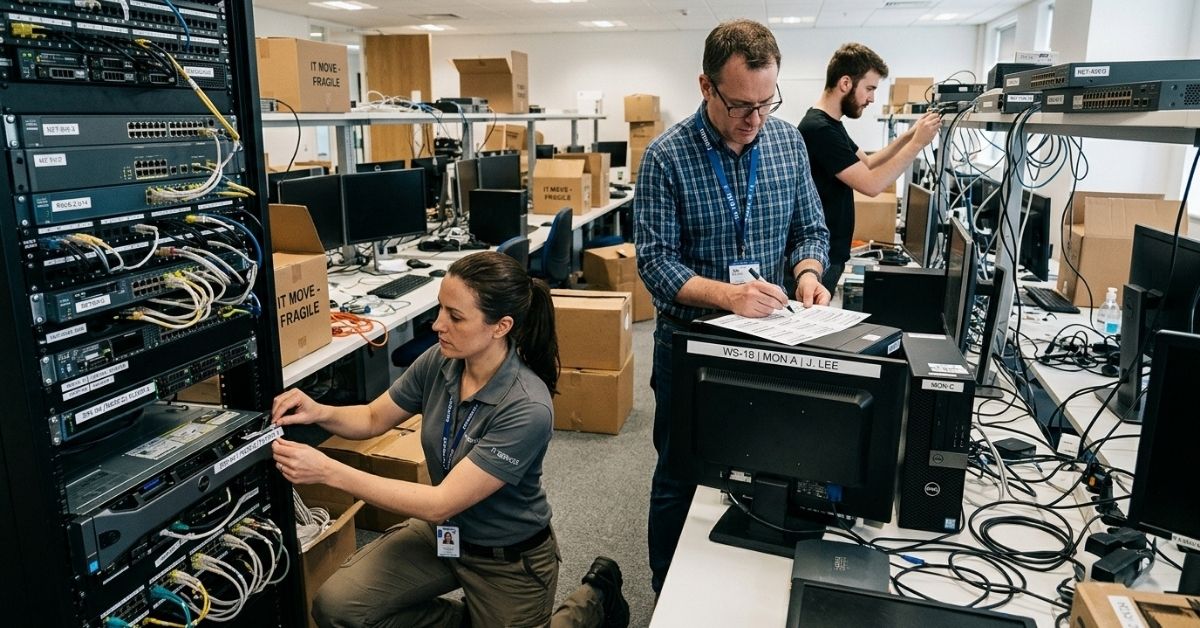
Technology often represents one of the most valuable business assets.
Before relocation:
Back Up Critical Data
Protect important information before equipment is disconnected.
Label Equipment
Identify all devices and cables clearly.
Document Configurations
Photograph workstation and server setups.
Schedule Technical Support
Ensure assistance is available before and after relocation.
Technology planning helps reduce downtime and prevent costly interruptions.
Real-World Clearwater Office Relocation Example
Consider a Clearwater accounting firm relocating to a larger office space.
Management initially focused on transportation expenses.
After conducting a full relocation review, they identified additional priorities:
- Technology migration
- Weekend scheduling
- Employee workstation assignments
- File organization
- Customer communication
By addressing these factors before moving day, the company completed its relocation with minimal disruption to client services.
This example demonstrates why comprehensive planning matters.
First Week After the Move Checklist
The relocation process does not end when the truck leaves. Way 2 Go Moving is here to help every step of the way.
During the first week, verify:
- Internet systems functioning
- Phone systems operational
- Employee workstations ready
- Inventory confirmed
- Vendor information updated
- Security systems tested
- Customer communications restored
- Team workflows functioning normally
A structured recovery process accelerates productivity.
How Professional Movers Help Businesses Save Money
Experienced commercial movers help businesses:
Reduce Downtime
Efficient scheduling minimizes operational disruptions.
Protect Equipment
Specialized handling reduces damage risks.
Improve Organization
Structured processes prevent delays.
Coordinate Logistics
Professional planning improves efficiency.
The right moving partner often helps businesses control both direct and indirect relocation costs.
Professional Office Moving Insight
One lesson experienced commercial movers consistently observe is this:
Businesses that focus exclusively on moving estimates often underestimate the cost of lost productivity.
The most successful office relocations balance transportation expenses, employee productivity, technology readiness, and operational continuity.
A successful move isn’t simply the least expensive move. It’s the move that allows your business to return to normal operations quickly.
Related Commercial Moving Resources
Businesses planning an office relocation may also benefit from:
- How to Move Your Business Without Losing Productivity
- Office Relocation Checklist for Businesses
- Commercial Packing Tips for Office Moves
- Reducing Downtime During Relocation
- Moving IT Equipment Safely During Relocation
- Office Relocation Checklist for Businesses
- Office Moving Costs Explained (Clearwater 2026 Guide)
Together, these resources create a comprehensive commercial moving knowledge center.
Understanding office moving costs Clearwater businesses face requires more than comparing estimates. Office size, technology requirements, building access, departmental needs, downtime risks, and planning all contribute to the total cost of relocation.
Whether you’re moving a small office or a larger corporate workspace, strategic planning can reduce expenses, minimize disruption, and support a smoother transition.
If you’re planning a commercial relocation, book a consultation with Way2Go Moving to discuss professional office moving, packing, storage, junk removal, and business relocation solutions tailored to your company’s needs.